How to close the customer feedback loop, step by step
A feedback loop is only closed when the person who asked hears what happened. Here is the loop step by step, who to tell at each status change, what to write and how to email people without annoying them.
A customer feedback loop has four steps: you hear what customers ask for, decide what to do about it, ship something, and tell the people who asked. The first three get the attention, because that is where the work is. The fourth is the one that slips, and when it slips, the people who gave feedback have no sign that it went anywhere, so they have little reason to give more.
This guide covers each step, who to tell and when, message templates for every status change (including “no”), and how to email people about their requests without annoying them.
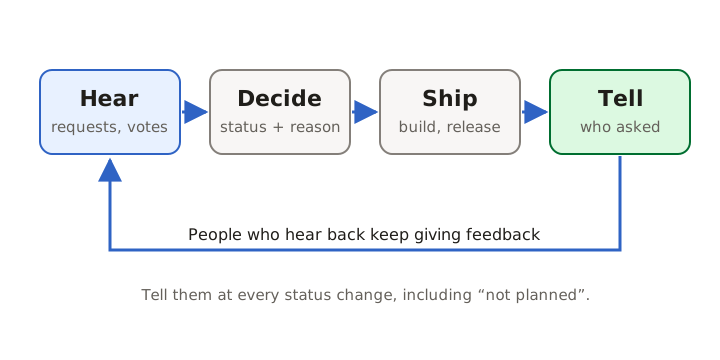
The four steps
1. Hear. Collect requests, bug reports and complaints in one place, with the name of each person who asked. If you cannot say who asked, you cannot close the loop with them later. Our product feedback guide covers collecting and sorting.
2. Decide. Give every request a status that means something: under review, planned, closed. A decision does not have to be “yes”. It has to be visible.
3. Ship. Build the thing, or the smaller thing that solves the same problem.
4. Tell. Let everyone who asked, voted or followed know what happened, in words they recognise, with a link to the result.
Why the last step gets skipped
By the time something ships, the request that started it is weeks or months old. The engineer who built it never saw the original message from support, the support agent has moved on to other tickets, and the release notes describe the feature, not the request. Nobody is responsible for connecting them.
The fix is structural, not a matter of discipline. If requests and releases live in the same system, and the system knows who asked, telling them becomes a side effect of shipping instead of a separate chore.
Close the loop at every status change
Waiting until something ships means some people wait a year with no word. Tell people when their request moves, and keep each message short: what changed, what it means, where to follow along.
Under review
Thanks for suggesting a calendar view for dated notes. We’re looking at it now, along with the other requests about planning ahead. We’ll update this post when we’ve decided.
Planned
Good news: offline access for the mobile app is planned. It isn’t scheduled for a specific release yet; we’ll post here when work starts. You’re getting this because you voted for or followed this request.
In progress
We’ve started building read-only share links for notebooks. If you’d like to try an early version, reply to this email.
Shipped
Dark mode now follows your system setting. Open Settings → Appearance to pin a theme instead. Thanks for asking for this; here’s the full update: (link to the changelog entry).
Closed (not planned)
We’ve decided not to build a built-in calendar view. Most people asking wanted to see what’s due this week, so we’ve added a “Due this week” filter instead. We know that doesn’t cover everyone; thank you for explaining your use case.
The last one matters most. A clear no ends the wait and keeps your board honest. Silence keeps people waiting and makes every other open request look like it might also be ignored.
Who to tell
Close the loop with everyone who has a stake in the request, not just the person who posted it:
- the author, and everyone who voted or commented;
- people who chose to follow it without voting;
- people whose duplicate requests you merged into it (another reason to keep votes and followers when merging);
- customers who asked through support, sales or email, if someone logged the request on their behalf.
How to email people without annoying them
Status updates are welcome when they are about something the person asked for. They become noise when they are frequent, vague or hard to stop. A few rules:
- Batch changes. If a request moves twice in an hour, send one email, not two. A short delay before sending also lets you undo an accidental status change before anyone is told.
- One subject per email. “Your request ‘Offline mode’ is planned” is better than a digest of everything that happened this week.
- Make stopping easy. Every update should have an unsubscribe link, and a “stop following this request” link that leaves other updates alone. The one-click unsubscribe standard, RFC 8058, has the sender add a
List-Unsubscribeand aList-Unsubscribe-Postheader to each message,Source [1] and Google’s sender guidelines require one-click unsubscribe for marketing and subscribed messages from senders of more than 5,000 messages a day to Gmail accounts.Source [2] Status updates may never reach that volume, but the same courtesy costs little.
Feedback tools treat closing the loop as a core feature
If you use a feedback board, check how it handles the last step. Several tools in the category notify people automatically when a request moves:
- Canny says that when a request is marked planned, in progress or complete, everyone who voted on it hears about it automatically.Source [3]
- Featurebase says it notifies upvoters automatically when work begins on a request or it ships,Source [4] and lists automatic feedback loop closing on its Free plan.Source [5]
- hearloop says verified accounts that voted, commented or posted are emailed when an idea changes status and when it ships.Source [6]
Read each vendor’s current pages before choosing; plans and features change. Our comparison pages list what each one publishes, with sources.
Measure whether the loop is closed
Two numbers tell you whether your loop works:
- Notified share: of the requests you shipped this month, how many had their voters and followers told? The target is all of them.
- Time to tell: how long between shipping and the people who asked hearing about it? Days are fine; months mean the step is manual and forgotten.
A third signal is qualitative. When people start replying “thanks, that was quick” to your updates, or posting new requests on the board instead of in support tickets, the loop is doing its job.
How UpVoiced closes the loop
In UpVoiced, which we are building, closing the loop is built into the status change. When your team moves a request on the board or the roadmap, everyone who voted, commented or followed is emailed. Changes are held for 30 seconds so an accidental move can be undone, and each follower gets at most one status email per request per hour. When you publish a changelog entry linked to requests, those requests move to Shipped, and if you choose to notify, their followers get a “your request shipped” email instead of a plain status change. Every email has a one-click unsubscribe and a link to stop following that one request.

For writing the update itself, see How to write release notes people read. UpVoiced is in development and not open for sign-ups yet; you can try the fictional demo and request early access.