How to manage feature requests: a process and a template
Feature requests are useful when they describe a problem and land in one place. This guide gives you a request template, a triage routine, the statuses to use and wording for "not now" and "no".
A feature request is a user telling you the product got in their way. Handled well, requests show you which problems matter to which customers. Handled badly, they become a backlog of duplicates that nobody answers, and the people who wrote them stop bothering.
This guide gives you a lightweight process: one place to collect requests, a template that captures the problem, a triage routine, statuses that mean something, and wording for the two hardest answers, “not now” and “no”.
What a good feature request contains
Most requests arrive as a solution: “Add a calendar view.” The solution may be right, but you cannot judge it without the problem behind it. A good request answers four questions:
- What were you trying to do? The task, in the person’s own words.
- What happened instead? Where the product stopped them, or what they do today as a workaround.
- How often does it come up? Daily friction and a once-a-year task deserve different priorities.
- Who is affected? Just them, their team, every customer in their industry?
A title in the user’s own words helps the next person with the same problem find it and vote instead of posting again.
A feature request template
Use this as the form behind your “Suggest a feature” button, or paste it into your board’s posting guidelines:
**Title:** [In your words: what do you want to be able to do?]

**What were you trying to do?**
[The task or goal, e.g. "send meeting notes to a client".]

**What happens today?**
[Where the product gets in the way, and any workaround you use.]

**How often does this come up?**
[Every day / every week / a few times a year]

**Who else is affected?**
[Just me / my team / everyone in my role]
Keep it short: each required field is one more thing to fill in before someone can press Send. Developer tools work the same way. GitHub’s issue forms, for example, let a repository define input types, validations, default assignees and default labels for each form,Source [1] so that reports arrive with the details the team asked for.
One place for every request
Requests come in through support tickets, sales calls, emails and in-app forms. If each channel keeps its own list, the same request gets counted five times and answered zero times. Pick one board and route everything to it:
- Users post and vote directly, on a public board or from a widget inside your product, where they can see existing requests before writing a new one.
- Support and sales add the request on the customer’s behalf (or add a vote to an existing one), so that customer is told when it moves.
- Your team posts what it hears in interviews and usage data, marked as such.

Triage: once per request, on a schedule
Triage is a short, regular pass over new requests. Each request goes through it once:
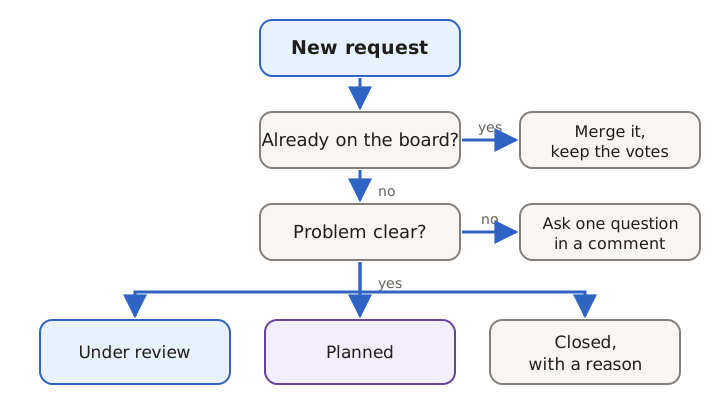
- Is it already on the board? Merge it into the existing post. Keep the votes and followers of both, so nobody loses their place in line or their notification.
- Is the problem clear? If not, ask one question in a comment. “What do you do today instead?” usually gets you there.
- Give it a status. Under review if you will consider it, Planned if you have decided to do it, Closed with a reason if you will not.
Thirty minutes a week is enough for most small teams. The goal is that no request waits more than a week for its first status.
Statuses that mean something
A status is a promise to everyone following the request. Use a small set and define each one:
| Status | Means | Tell followers? |
|---|---|---|
| Open | Received, not yet reviewed | No |
| Under review | We are considering it | Yes |
| Planned | We have decided to build it | Yes |
| In progress | Someone is building it | Yes |
| Shipped | It is live | Yes, with a link |
| Closed | We will not build it, and here is why | Yes, with the reason |
Avoid statuses like “Maybe later” that never change. If a request is not planned, close it; you can always reopen it.
Prioritising without letting votes decide alone
Votes show demand among the people who found your board and voted. They are a useful signal and a poor sole criterion: they favour ideas that are easy to describe, and they do not count customers who never visit the board. When you review the most requested problems each month, look at four things together:
- Demand: votes, and how many separate requests were merged into one post.
- Who is asking: customers on which plans, in which segments, at which stage.
- Fit: does it move the product where you want it to go?
- Effort: a rough size is enough to compare options.
Write down why you chose what you chose. When someone asks why their request was not picked, you will have an answer that is not “we forgot”.
How to say “not now” and “no”
Two messages you will send often:
Not now: “We’ve reviewed this and won’t get to it in the next few months: we’re focused on offline access first. We’re keeping it open and will update this post if that changes.”
No: “We’ve decided not to build a built-in calendar. Most people asking wanted to see what’s due soon, so we’ve added a ‘Due this week’ filter. Thanks for explaining how you work; it shaped that decision.”
Both are better than silence, and both should go to everyone following the request. For message templates at every other status, see How to close the customer feedback loop.
Choosing a feature request tool
A spreadsheet works until people outside your team need to see or add to it. When you look at feature request tools, check that they:
- let users vote on existing requests and show likely duplicates while they type;
- let your team merge duplicates without losing votes or followers;
- let support and sales add requests or votes on behalf of customers;
- notify followers automatically when a request changes status;
- connect requests to a public roadmap and to your changelog;
- keep internal notes private.
Some tools add AI suggestions on top. Featurebase, for example, lists AI board and duplicate-post suggestions from its Growth plan.Source [2]
How UpVoiced handles feature requests
In UpVoiced, which we are building, users post and vote on your portal or from the in-app widget, and similar-post hints appear while they type, before a duplicate is created. Your team triages in a keyboard-first inbox with filters for board, status, tag and approval; merging moves votes to the post you keep. Statuses come with the defaults above (Open, Under review, Planned, In progress, Shipped, Closed), and every status change emails the people who voted, commented or followed.

If you are moving from another tool, UpVoiced imports CSV exports from Canny, Featurebase and hearloop. UpVoiced is in development and not open for sign-ups yet; try the fictional demo or request early access. For the bigger picture, read our product feedback guide.